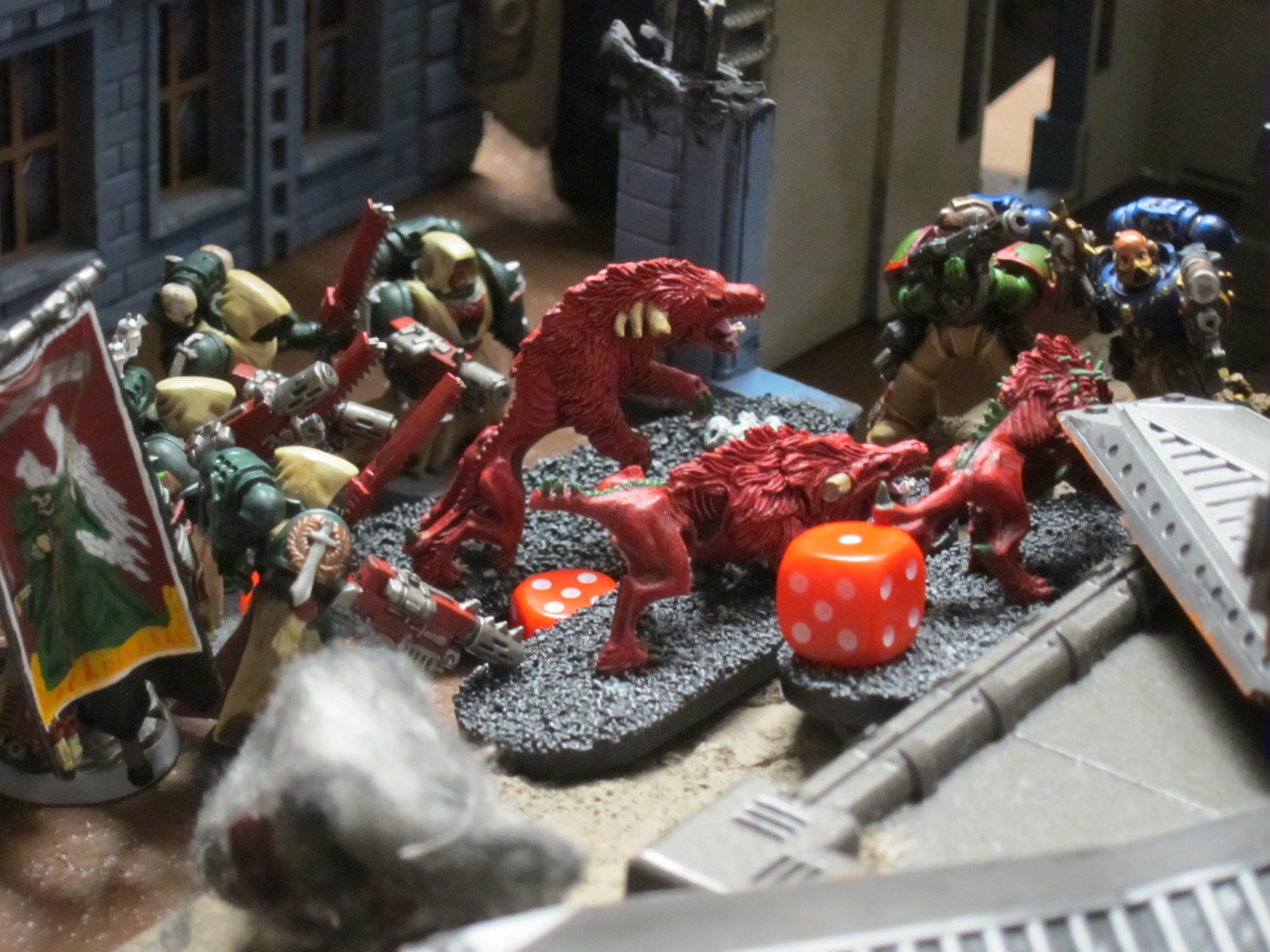
40k: Alternate Maelstrom

One of the big changes to Warhammer 40,000 with 7th edition was of course the new class of official missions: Maelstrom. Upon first hearing rumors of it I was really excited, enough to pre-order the associated cards. They’ve been underutilized though because I found the final release so lackluster compared to its potential. In the tournaments and events I’ve run this year we’ve used an alternate set of Maelstrom-style tactical objectives and mission rules. They seem to work really well, addressing some of the big issues while preserving the positive aspects and adding some interesting innovations, so I thought I’d finally get around to sharing.

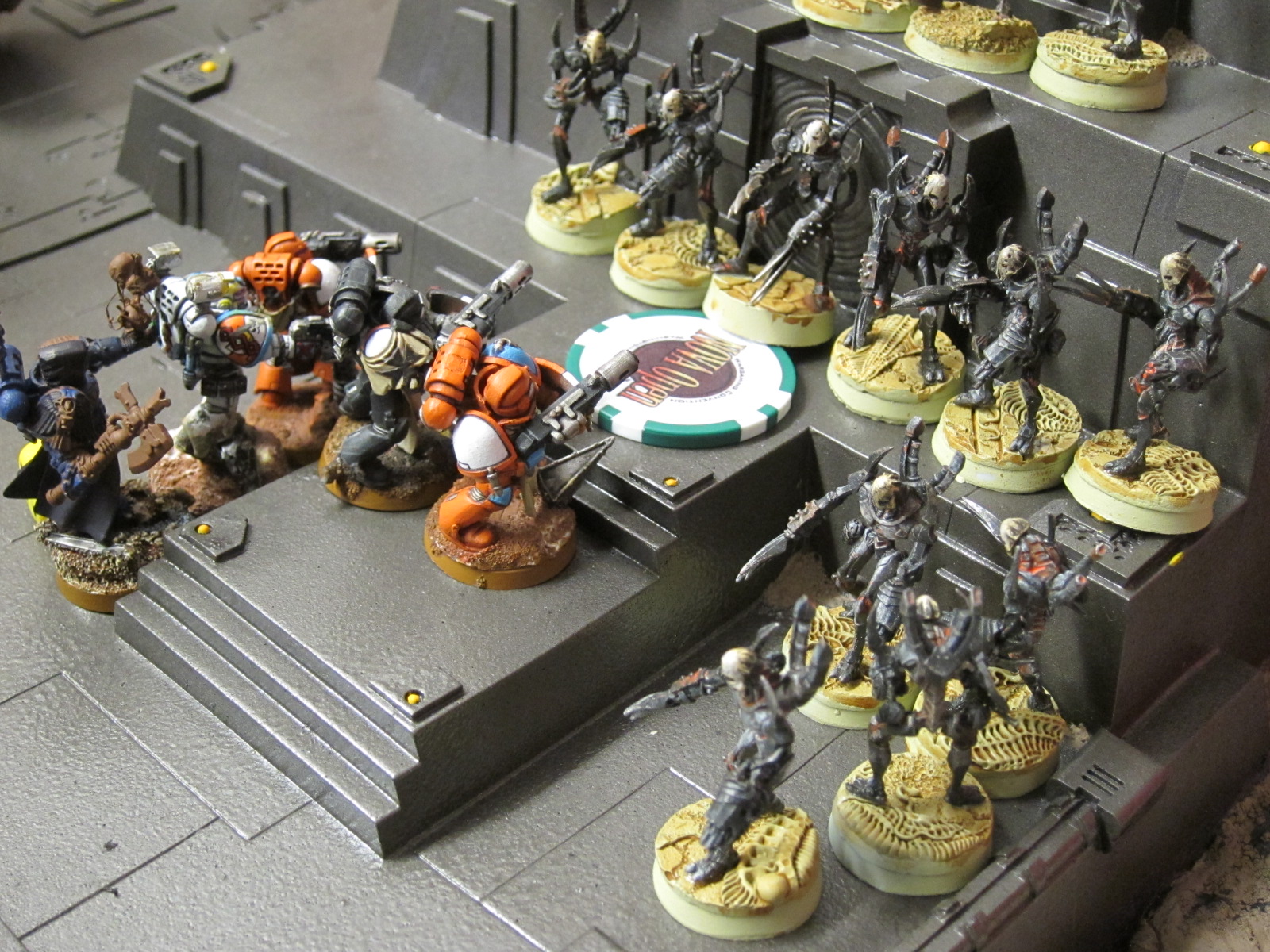
Into the maelstrom!

Into the maelstrom.

Just Roll Some Dice!

The heart of Maelstrom is randomized missions. In traditional 40k, players essentially compete for control over a set of objective markers placed on the board, or simply to kill all the opposing units. Maelstrom has players randomly determine smaller scoped objectives throughout the game. By drawing cards or rolling on a table, they’re directed to control specific objective markers, kill a stipulated type of unit, or even make particular actions in order to score points.

Official Maelstrom has many shortcomings. Some are easily rectified or mitigated. One such common house rule is to immediately discard impossible tactical objectives, e.g., if your opponent has no units of a necessary type. That this is so obvious an improvement only highlights how little effort GW put into their rules. It’s worth noting though what seems to be a frequently overlooked subtlety: Should tactical objectives be discarded only if they were never possible, or even if they’re impossible when drawn? The “Kill a psyker” goal highlights the difference: Can it be discarded immediately only if the opponent never had a psyker in their army, or can it also be discarded if all their psykers are merely already slain? I don’t have strong feelings either way and the two probably don’t offer vastly different experiences in practice, but this is a design decision to be made consciously.

Beyond a few such smaller problems, there are two design patterns throughout the stock Maelstrom that really gall me. Most obvious and frequently addressed in tournaments are random results. It’s absolutely deleterious to strategic play to have tactical objectives yield random amounts of victory points once achieved. A variety of reasonable house rules could address that and are frequently applied, e.g., always claim the maximum, or roll for the value when the objective is drawn. The latter actually imposes an interesting strategic evaluation of effort versus reward while maintaining the basic Maelstrom philosophy of unknown and variable objectives. That it’s such a small tweak but vastly better again highlights just how little design effort GW expends. In any event, a variety of hotfixes are possible for these objectives, but at some point you may as well just replace them.

Most upsetting to me though are the forced play tactical objectives, that award victory points simply for executing game mechanics. Instead of presenting a goal to work toward, they merely give away free points or, worse, dictate play. Many are actions you may be trivially doing anyway, such as Daemons and the “Cast a psychic power” condition. Others force you to make micro-level  moves that may not fit your army or macro-level situation at all—may the Greater Good shine on Tau that draw the “Make an assault” card! Scoring should be based on game conditions to be achieved, not making the player a puppet enacting pre-scripted actions.

Random results and forced play goals come from the same “Just roll dice & push models around!” mentality of Games Workshop that gave us random psychic powers and warlord traits. Otherwise stock Maelstrom could be solid with just a house rule or two and some card tweaks, but those aspects warrant substantial reworking.
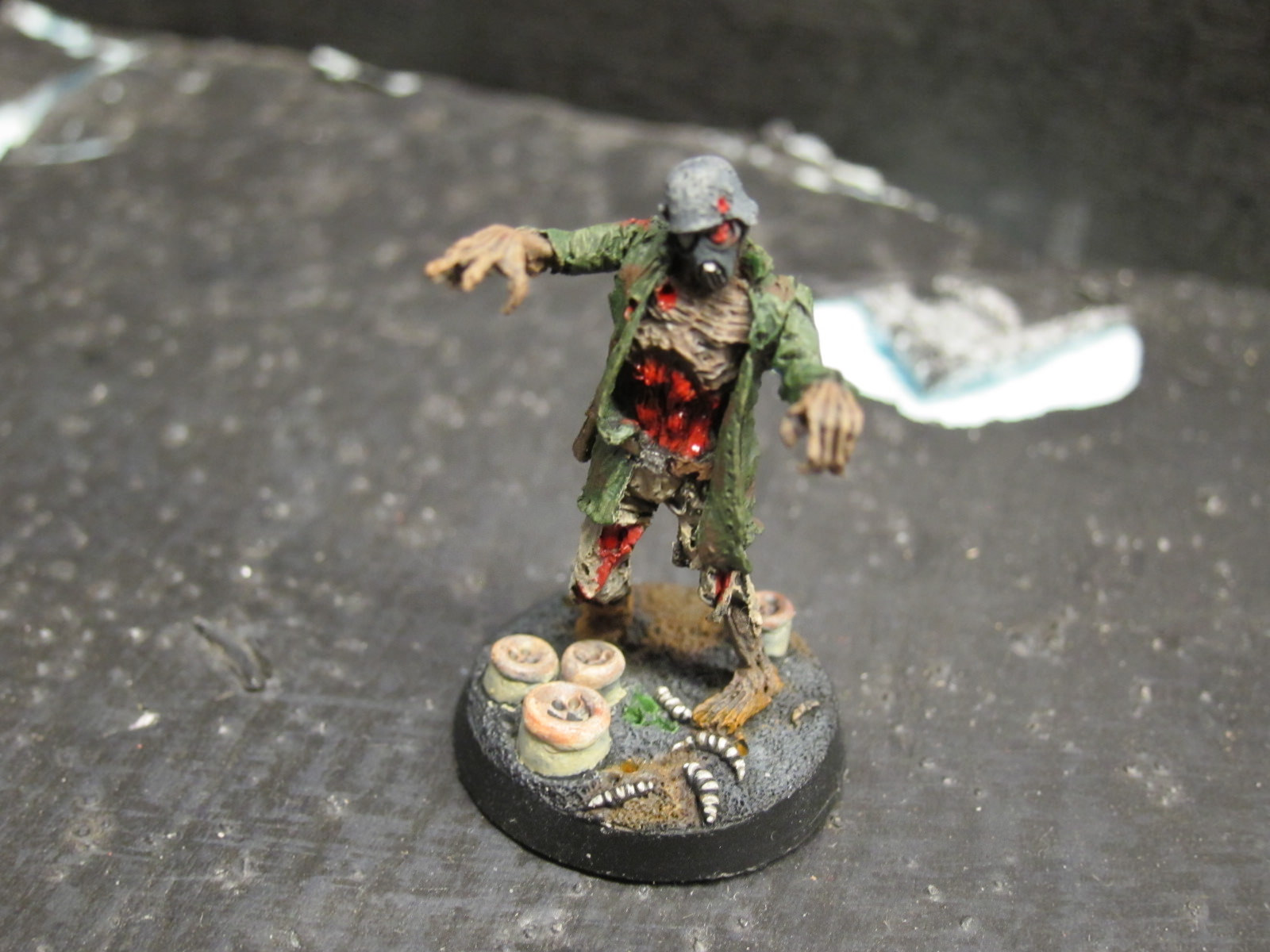
A Games Workshop game designer shambles in to work.

A Games Workshop game designer shambles in to work.

Flexibility & Deathstars

At this point it’s worth noting what is in fact appealing about Maelstrom. The surface level attraction is just the variability of it. Sooner or later most everybody wants to play something different from the Eternal War missions that have been carried through editions under one name or another for literally decades now.

As an event organizer and game designer though, what really calls to me about that variability is the flexibility it requires of the players and their armies. To really capitalize on the Maelstrom tactical objectives, you need to be able to move all about the table, and to easily switch back and forth between killing specific units versus claiming objectives. The downside of this is that it encourages armies built around—and perhaps even spamming—small, highly mobile units. Arguably the format is imbalanced toward factions with more or better units of that style. However, given that many of the recent balance problems in 40k have revolved around deathstar units or even unstoppable single models, tipping the scales the other way is not necessarily unwelcome. In my events we mitigate the chance of going too far that way by generally also including other missions for which more “grind-em-out” style armies are perhaps better suited.
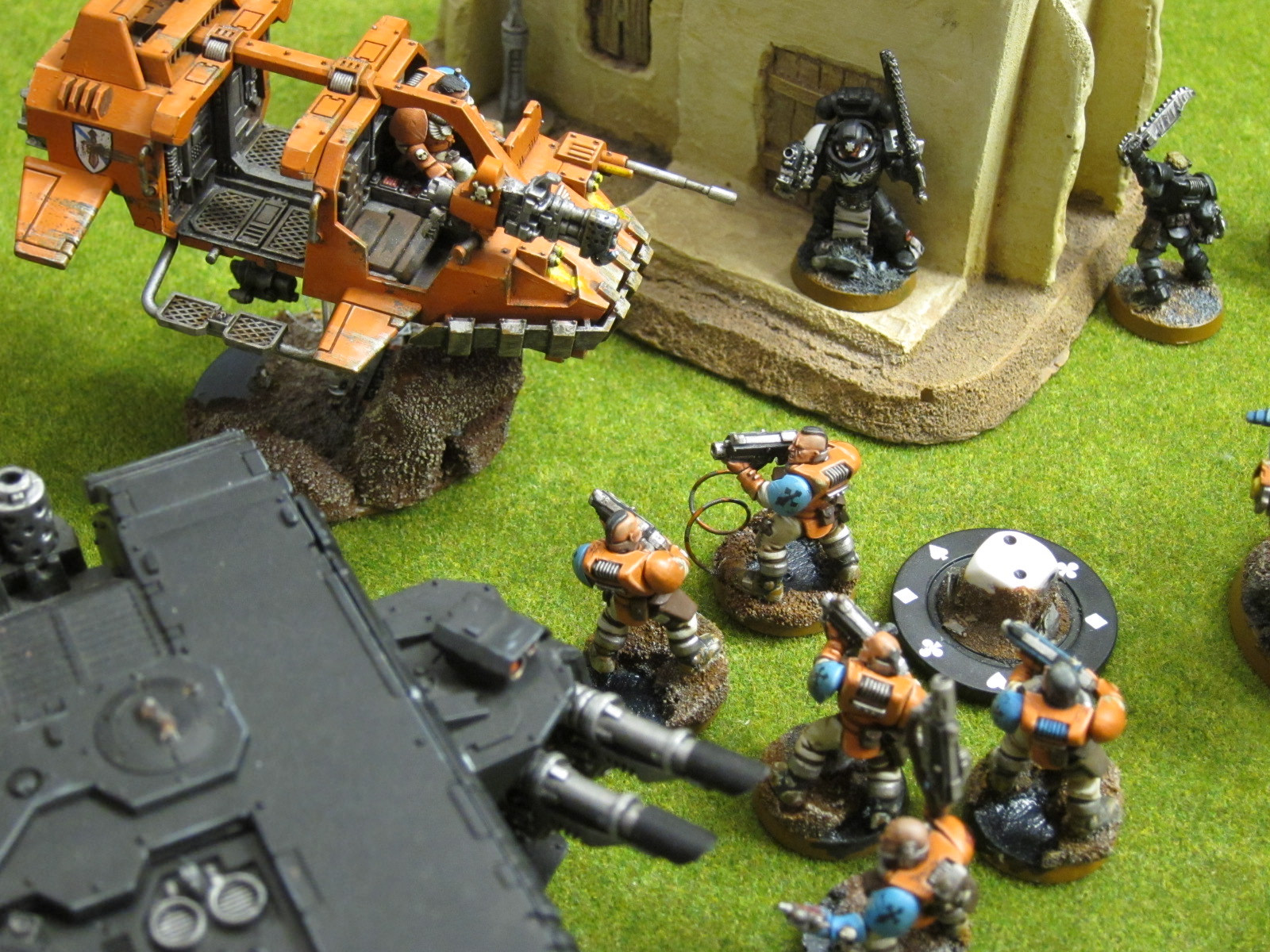
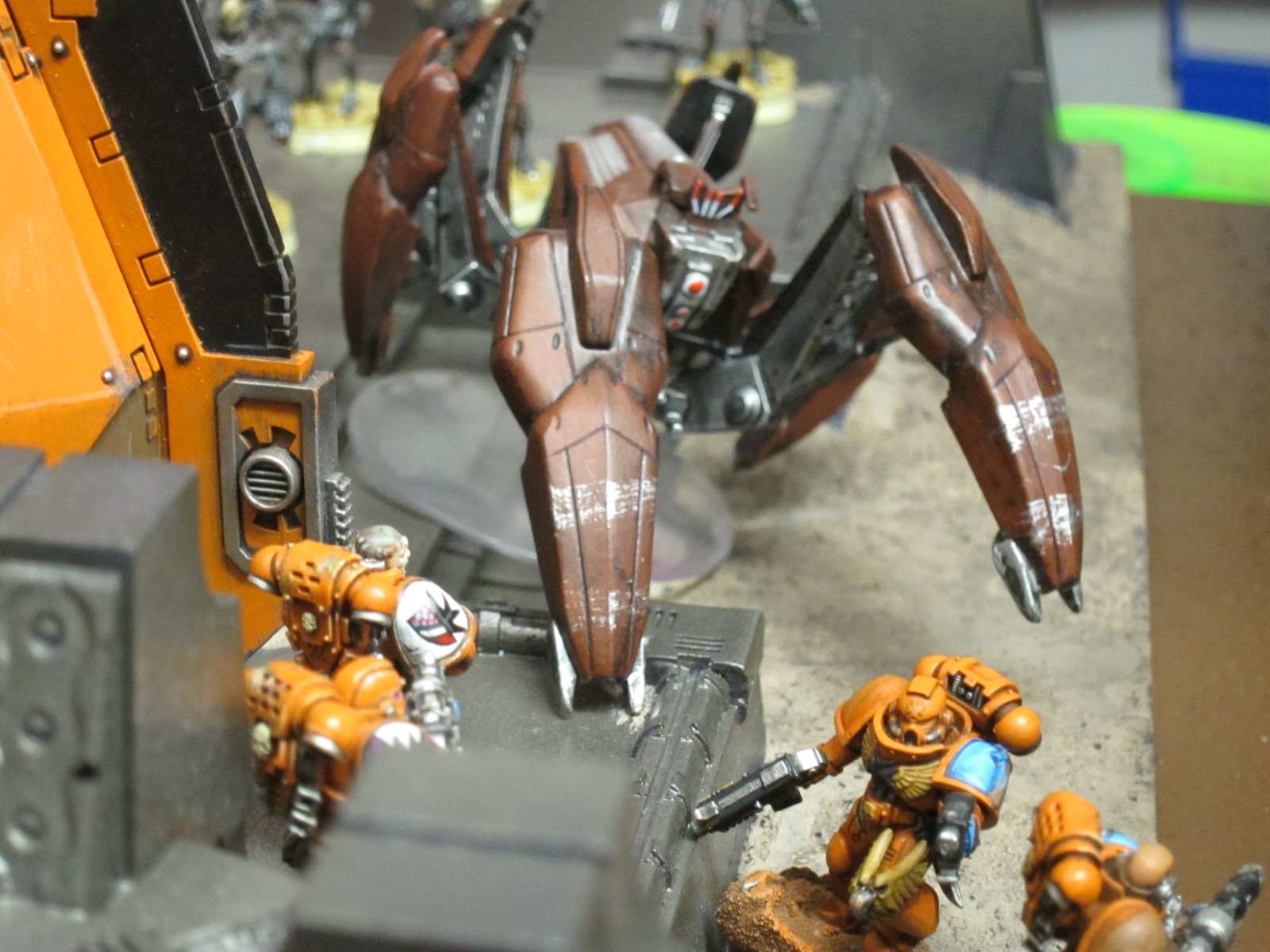
These guys are definitely here for the Maelstrom party.

These guys are definitely here for the Maelstrom party.

Logistics

In developing a revised Maelstrom mission as an event organizer rather than an individual player, I also had to keep in mind some logistics. If you don’t buy GW’s cards, stock Maelstrom missions are kind of a hassle to execute. Tracking which tactical objectives are in play, discarded, and achieved isn’t a huge deal, but it’s not nothing either. Without the cards you’re left just scribbling things down. In order to keep my events on time while enabling games to play out fully, and to alleviate the burden on our more casual, less frequent players, I really wanted to structure and streamline the bookkeeping. At the same time, this alternate format was developed for and used within small, monthly shop tournaments. In that context it’s not practical for me to print and/or make and give out whole new Maelstrom card decks as some bigger events like Adepticon have done.

A New Maelstrom

The core of my revised Maelstrom is this table of tactical objectives:
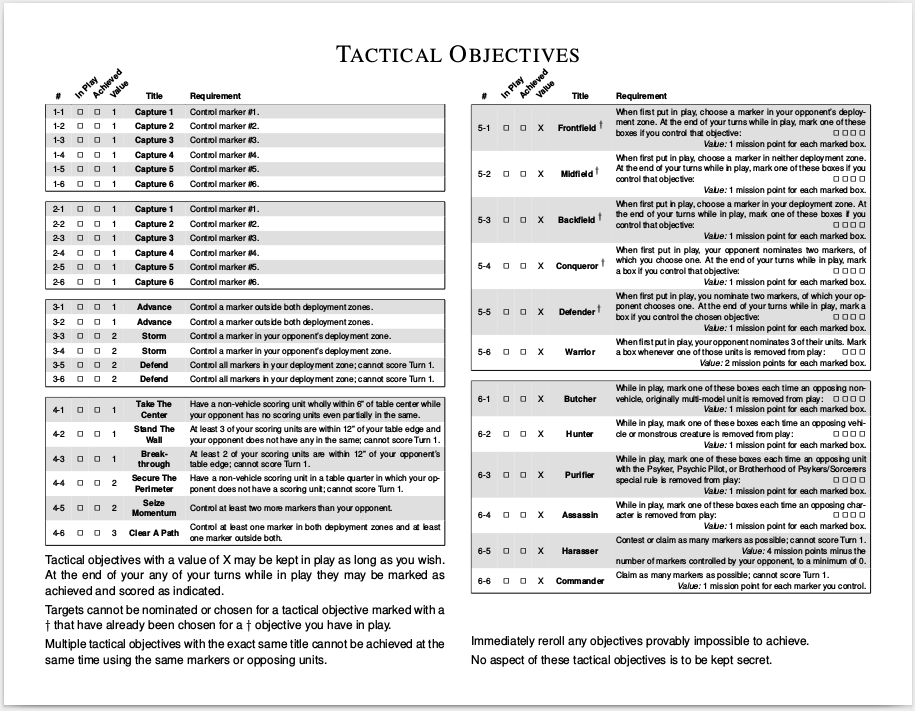
Screenshot_2015-10-21_23-37-21

[ Download as a PDF ]

Our mission packets include two copies of this for each Maelstrom mission. The players rip them out and each mark one up throughout the game for their bookkeeping. Mechanics are as follows:

  • To draw a tactical objective, roll a D66 and consult your tactical objective table. If that objective is already in play for you, has been achieved, or is scratched off, roll again. Similarly, if that objective would be provably impossible to score, e.g., your opponent has no characters remaining, roll again. Once a valid objective has been rolled, mark it as in play.
  • Targets cannot be nominated or chosen for a tactical objective marked with a † that have already been chosen for a † objective you have in play.
  • At the end of your turns, check the requirements for each tactical objective you have in play. For each fixed-value objective met, mark it as achieved and score the associated value in mission points (n.b.: not victory points). Tactical objectives with a value of X may be kept in play as long as you wish. At the end of any of your turns while in play they may be marked as achieved and scored as indicated. Once achieved, objectives are no longer considered in play and cannot be put in play or scored again.
  • Multiple objectives can be scored in a turn, caveat that you cannot achieve multiple tactical objectives with the same exact title in the same turn using the same marker(s) or unit(s). E.g., to score both Storm objectives at once, you would need to simultaneously control two separate markers in the enemy deployment zone.
  • At the end of your turn you may scratch out one of your tactical objectives in play to remove it from play.
  • Tactical objectives in play, achieved, and scratched out are not secret.

Each particular mission will then have a rule controlling the number of cards drawn, similar to the various official Maelstrom missions. Two examples we’ve used include:

  • Standing Orders. At the start of your turns, draw tactical objectives until you have a total of six in play.
  • Into the Maelstrom. At the start of your turns, draw tactical objectives until you have as many in play as the current game turn number.

Rather earning victory points directly, at game end the players are scored by comparing mission points earned via tactical objectives achieved, and awarding victory points to the higher and lower scorer according to this table:

Screenshot_2015-10-21_23-51-31

Scoring in that indirect fashion rescales the substantial number of tactical objectives that might be achieved into the 9 VP primary objective cap around which our missions are designed (they also include secondary and tertiary objectives, for a total of 20 points available in each round). In doing so the results are also normalized a bit across matches, such that one player cannot gain an insurmountable lead in the tournament by winning with a ridiculous number of tactical objectives achieved, while another victorious player falls far behind despite also trouncing their opponent but by a less ridiculous amount. In general it’s important to normalize in some fashion like this to determine the strength of a result for a Maelstrom mission, given that the actual number of tactical objectives achieved can be so variable match to match. The specific value ranges here were determined by Sascha Edelkraut and seem to work well for our 9 VP cap.

Strategy

These new tactical objectives of course eliminate random results and forced play. However, Maelstrom’s overall variability and requisite flexibility is still maintained.

Further, the X-valued objectives are a novel mechanic I haven’t seen in 40k. They enable the player to make an ongoing strategic evaluation of effort versus reward for that condition, either pushing on to try and acquire another point or to cut bait and dump it for a new, hopefully easier, objective. Objectives that require the player to nominate a target also encourage players to declare a goal and then work toward it, rather than simply hoping they draw tactical objectives for markers they’re already holding. The several variations with one player putting forward several proposals and the other choosing among them are also an interesting twist, adding a new interaction and a little bit of adversarial forward thinking.

Last but not least, these tactical objectives rightfully focus heavily on controlling objective markers. However, a number also offer opportunities to play toward pure mobility, as well as annihilation-style kill point hunting. Particularly with the X-valued mechanic enabling players to work toward them for some time or not, this gives a real, conscious strategic choice about whether or how much to focus on the various types of goals, while still staying within the overall chaotic Maelstrom framework of variable objectives and necessary flexibility. You can’t win a tough match if you can’t play for both objective markers and kill points to at least some extent, but you do have some opportunity here to strategically focus your efforts on one or the other. In general that kind of choice in both play and army construction is a major goal of the mission format for our events.

Evaluation

We’ve used this format in a number of small scale tournaments (8–16 players) this year, and it’s worked very well. The logistics for me as event organizer are trivial, I simply include multiple copies of the tactical objectives sheet above in each mission packet. For players the bookkeeping is fast and intuitive to execute once explained.

To game design, random results and forced play are eliminated while still maintaining the variability and requisite flexibility of Maelstrom play. Further, a number of novel mechanics offer new and ongoing strategic evaluations to the players, as well as affording meaningful selections between different strategic concentrations and army styles.

One notable downside of this setup is that it’s not as tactile as cards. However, for a large enough event or as a one-off occassion it would be easy to convert the objectives table and mechanics into cards. A related note though is that several players have been disappointed at not being able to use faction-specific tactical objectives published by Games Workshop. This is unfortunate, but given the rampant problems among those with random results and imbalanced conditions, I don’t see any acceptable approach but to disallow their use in tournaments.

Play!

Again, the tactical objectives sheet is available as a printable PDF. For an example of how this format has been incorporated into a tournament, check out the mission packet for our June event, The Tournament of Blood. These rules and the objectives table are released into the public domain, so please copy, edit, and use as you wish. We would though love to hear about any use of these, as well as suggestions or questions, in the comments below.  Good luck in the Maelstrom!

Descent into the Maelstrom!
Descent into the Maelstrom!

Basic Scaling, Animation, and Parallax in Pixi.js v3

A basic challenge in mobile games is dealing with varying screen sizes and resolutions. This post is a quick demo and writeup playing with the Pixi.js 2D graphics library for HTML5 games, showing how to scale a fixed-size game worldview to fit a given display, whether it be a device screen or a container on a page. In doing so it leverages some Pixi features to use upscaled resources for Retina and other high resolution displays. The demo also illustrates some basic mechanisms for sprite animation and parallax scrolling in Pixi v3, as well as preparing spritesheets using TexturePacker.

Questions are best posted to the HTML5 Game Devs Pixi forum, where many people, including Pixi.js developers, may answer them. But I’ll attempt to address any raised in the comments here. Suggestions and corrections are of course also welcome!

Flappy Monster

The demo is running here, or you can load it on its own, or view the source:

If everything has worked, there should be a monster endlessly flying across the screen as background and foreground graphics scroll along.

Aspect Ratio

The goal here is a common game design in which either the conceptual game world has a fixed size and is viewed in its entirety, or there is a fixed-size view into a larger conceptual game world. In either style that view is then scaled when drawn to fit the screen or display space as best as possible without cutting anything off or changing the aspect ratio (width divided by height). This frequently results in the “black bars” seen in videos or many mobile games, as part of the display is unusable unless the aspect ratios of the view and available display space match.

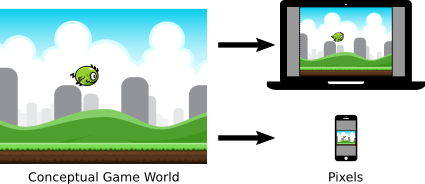
The fixed-size conceptual world, or a view of it, is mapped to the pixels of the display in use.

The fixed-size conceptual world, or a view of it, is mapped to the pixels of the display in use.

This demo has a conceptual world of 800×600 units, viewed in its entirety. When the monster flies off the screen and wraps around, it’s moving in and testing against a world 800 units wide. The instance displayed above has been fixed to a display of 480×360 pixels and the drawing scales accordingly. There is no dead space because the aspect ratios match. If you bring up the demo by itself in your browser, it will scale to fill the screen and re-scale if you change the window size. On my Samsung S3 it does the same according to my current device orientation:

Landscape orientation.

Landscape orientation.

Portrait orientation.

Portrait orientation.

The pink areas there are the dead “black bar” spaces that can’t be utilized without changing the aspect ratio or cutting off content. In an actual game these would be actually black, or house some decorative graphics or even game UI elements.

Renderer & Scaling

The demo instantiates a Pixi renderer and a top level stage container as follows:

        var rendererOptions = {
          antialiasing: false,
          transparent: false,
          resolution: window.devicePixelRatio,
          autoResize: true,
        }
        
        // Create the canvas in which the game will show, and a
        // generic container for all the graphical objects
        renderer = PIXI.autoDetectRenderer(GAME_WIDTH, GAME_HEIGHT,
                                           rendererOptions);

        // Put the renderer on screen in the corner
        renderer.view.style.position = "absolute";
        renderer.view.style.top = "0px";
        renderer.view.style.left = "0px";

        // The stage is essentially a display list of all game objects
        // for Pixi to render; it's used in resize(), so it must exist
        stage = new PIXI.Container();

        // Size the renderer to fill the screen
        resize();

        // Actually place the renderer onto the page for display
        document.body.appendChild(renderer.view);

        // Listen for and adapt to changes to the screen size, e.g.,
        // user changing the window or rotating their device
        window.addEventListener("resize", resize);

Scaling of the display is encapsulated in a function so that it can be called each time the screen changes, i.e., the window is resized, the game is sent fullscreen, or the device flips between portrait and landscape:

      function resize() {

        // Determine which screen dimension is most constrained
        ratio = Math.min(window.innerWidth/GAME_WIDTH,
                         window.innerHeight/GAME_HEIGHT);

        // Scale the view appropriately to fill that dimension
        stage.scale.x = stage.scale.y = ratio;

        // Update the renderer dimensions
        renderer.resize(Math.ceil(GAME_WIDTH * ratio),
                        Math.ceil(GAME_HEIGHT * ratio));
      }

Note that the autoResize option set in creating the renderer does not automatically install an event handler like this. Instead, it controls whether or not the CSS dimensions of the renderer are also set when its dimensions are changed, which is important in the next section.

All together, this code creates a Pixi renderer, then resizes it and scales the graphics to best fill the available display space.

The first step in that resizing is calculating the scaling ratio, as determined by the most constrained axis. The ratios between each of the horizontal and vertical screen dimensions and the corresponding game worldview dimensions are compared, with the least ratio defining the most we can scale the game: That worldview dimension times the ratio equals the screen dimension. Note that in general this is not quite as simple as picking the smaller screen dimension and dividing, because of how game and screen aspect ratios may compare; e.g., a very tall game could be constrained by the height even in portrait orientation despite that being the long axis.

The stage is then simply scaled by that ratio. As it contains all of the objects to be drawn, this factor will be applied to every object as they’re drawn, scaling them from the game world to the screen.

Finally, the on-page renderer itself is resized to fill the most constrained dimension.

At this point, the game will scale appropriately on desktops to fill available space.

Viewports

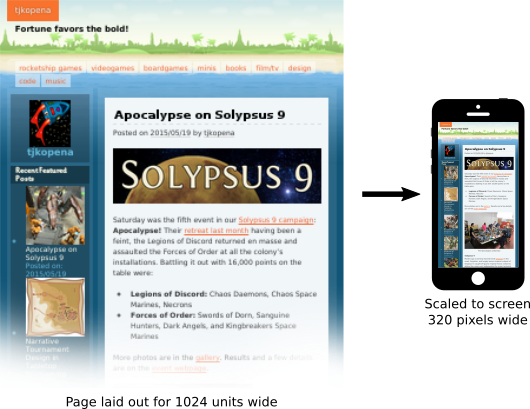
The next complication is managing browser viewports. Historically, a real issue in web design developed when smartphones initially became widespread. With their small screens and few pixels, web pages designed for typical desktop displays simply didn’t look or work correctly if laid out to the tiny handheld dimensions. So a viewport was introduced to the browsers. Exactly similar to the world scaling above, pages were laid out to conceptual dimensions similar to a desktop display to produce their expected look, and then scaled down when drawn on screen. This mapping step also enables other features, such as the page layout not continually changing as the user zooms in or out.

Viewports decouple page dimensions and layout from actual device display limitations or capabilities.

Viewports decouple page dimensions and layout from actual device display limitations or capabilities.

A consequence of the viewport is that by default the page dimensions visible to the game code on mobile devices may have little direct bearing to the actual physical display. They also vary widely by browser and device. The viewport meta tag must be used in the page’s head to direct the browser to report the actual screen dimensions and to not scale the page display:

    <!-- Viewport meta tag is critical to have mobile browsers
         actually report correct screen dimensions -->
    <meta name="viewport"
          content="width=device-width, initial-scale=1, user-scalable=no" />

The three options there respectively tell the browser to set the viewport as the same size as the screen, not to scale it, and not to let the user scale it either. With that specification the browser will report the screen dimensions, and the earlier code will scale the game appropriately even on mobile devices. Success!

Hi-Res

The next step is accounting for pixel density. Most upper end mobile devices today actually have many pixels compared to traditional displays, even if the screens are physically still small. The browser variable window.devicePixelRatio reports this resolution. On standard desktop displays it’s a 1, and on high resolution displays such as a smartphone it will typically be 2 but perhaps another value.

The code above already accounts for pixel density in its calculations. Despite the viewport settings, mobile browsers still don’t report the actual screen dimensions via window.innerWidth and window.innerHeight, but instead a virtual page size scaled from the screen by the inverse of window.devicePixelRatio. So, in portrait mode with those viewport settings, a Samsung S3 reports a window width of 360 units even though the screen is 720 pixels wide. However, the device pixel ratio is passed to Pixi via the resolution renderer option, which scales the canvas to compensate.

Another consequence of high resolution devices is that images may deteriorate when scaled to suit those large pixel counts. Sometimes this isn’t a problem, but Pixi makes it easy to swap in higher resolution assets when appropriate. In loading an image or spritesheet, if Pixi detects an “@2x” in the filename, it interprets the asset as a high resolution graphic; e.g., in loading the monster:

        if (window.devicePixelRatio >= 2) {
          loader.add("monster", "monster@2x.json");
        } else {
          loader.add("monster", "monster.json");
        }

From there the game code can largely forget about this detail. In particular, the sprite’s width and height are adjusted by that resolution and report the same dimensions as the standard version. Internally though, between Pixi and the browser, when the graphic is rendered, the high resolution source image entails that the image does not have to be scaled (as much) to output to the high resolution device, resulting in a crisp(er) image. In the code above, the autoResize renderer option is needed to have Pixi adjust the canvas element’s CSS styling in order to make this work correctly.

Standard and hi-res spritesheets for the flappy monster.

Standard and hi-res spritesheets for the monster.

Animation

With the renderer set up appropriately and the spritesheet loaded, it is then easy to display and animate the monster. For this trivial demo, several global variables are created, along with a hardcoded list of frame names defined in its spritesheet:

      var monster;
      var FRAMES = [
        "frame-1.png",
        "frame-2.png",
        "frame-3.png",
        "frame-4.png",
      ];
      var frameindex;
      var frametime;
      var FRAMERATE = 0.08;
      var VELOCITY = 100;

The monster is then instantiated, taking the first frame as its initial texture:

        // Create the monster sprite
        monster = new PIXI.Sprite(PIXI.Texture.fromFrame(FRAMES[0]));
        frameindex = 0;
        frametime = FRAMERATE;
        monster.anchor.x = 0,5;
        monster.anchor.y = 0.5;
        monster.position.x = -monster.width/2;
        monster.position.y = GAME_HEIGHT/2 - monster.height/2;
        stage.addChild(monster);

Note that the monster is positioned within the game world dimensions, not the screen dimensions. Because the resolution is automatically set on the graphic and its dimensions adjusted appropriately, and we’re retrieving the texture by the frame name in the spritesheet rather than the image filename, the detail of whether or not a high resolution asset is in use can be ignored. Additionally, because the standard image size is keyed to the conceptual game world dimensions, we can simply use that in centering and moving the monster.

A standard HTML5 animation loop is then established, calling an update and render function as fast as possible while matching the framerate of the display:

        // Prepare for first frame of game loop/animation
        lasttime = new Date().getTime();
        requestAnimationFrame(animate);
      function animate() {

        // Determine seconds elapsed since last frame
        var currtime = new Date().getTime();
        var delta = (currtime-lasttime)/1000;

        // Scroll the terrain
        background.tilePosition.x -= BG_RATE*delta;
        foreground.tilePosition.x -= FG_RATE*delta;

        // Move the monster
        monster.position.x += VELOCITY*delta;
        if (monster.position.x > GAME_WIDTH + monster.width/2) {
          monster.position.x = -monster.width/2;
        }

        // Animate the monster
        frametime -= delta;
        if (frametime <= 0) {
          frameindex++;
          if (frameindex >= FRAMES.length) {
            frameindex = 0;
          }
          monster.texture = PIXI.Texture.fromFrame(FRAMES[frameindex]);
          frametime = FRAMERATE;
        }

        // Draw the stage and prepare for the next frame
        renderer.render(stage);
        requestAnimationFrame(animate);
        lasttime = currtime;

      }

This function first moves the monster within the game world space, wrapping it around the edges. Rather than directly adding to its position, the monster has a velocity of 100 pixels per second. Multiplying that by the time elapsed since the previous frame and adding to its position calculates the monster’s new location in the game world. Applying this trivial kinematic formula deals with changes in frame rate and the update cycle on different devices and under varying processor loads, ensuring the monster always moves consistently.

The other component is a simple timer which triggers the monster’s texture being set to the next frame in its animation sequence every fraction of a second. This loops through the list of frames, producing the flapping animation. Pixi does include a MovieClip sprite component for doing basic animation in the same way, but many games require more direct access and manipulation of the animation, built on similar code as that here.

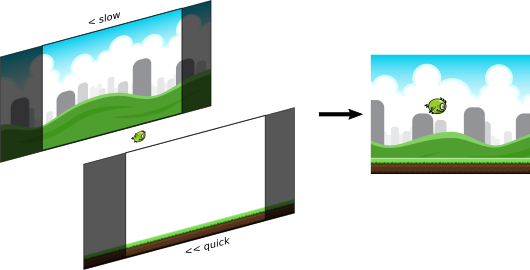
Parallax Scrolling

The monster of course needs a world to fly in. For this demo and even many basic games, it’s enough to have a simple image scrolling past. Pixi supports this readily via tiling sprites. The demo uses two of these, a background and a foreground, scrolling at different rates to create the illusion of depth via parallax, whereby the apparent positions of objects at a distance shift more slowly as the viewer moves.

These tiling sprites are instantiated and added to the display similarly to a regular Pixi sprite. One difference is that they take explicit width and height parameters defining the tiling sprite’s dimensions. The source graphics are then pattern repeated within that sprite as necessary to create the rendered image. In this demo the background sprite is sized to fill the whole screen, while the foreground is a single strip placed along the bottom edge:

        // Create the scrolling background
        background =
          new PIXI.extras.TilingSprite(PIXI.loader.resources.background.texture,
                                       GAME_WIDTH, GAME_HEIGHT);
        stage.addChild(background);

        // Create the scrolling foreground tile
        foreground =
          new PIXI.extras.TilingSprite(PIXI.loader.resources.foreground.texture,
                                       GAME_WIDTH,82);
        foreground.position.y = GAME_HEIGHT - foreground.height;        
        stage.addChild(foreground);

Within the animation loop, the starting position of that pattern is then adjusted to make the images scroll:

        background.tilePosition.x -= BG_RATE*delta;
        foreground.tilePosition.x -= FG_RATE*delta;

The monster now appears to be flying above some grassy ground, with hills and towers in the distance behind!

Composition of the scene.

Composition of the scene.

Assets

Finally, a note about assets and how they’ve been prepared.

The monster and background are both open game art by Bevouliin. Thanks to Bevouliin for publishing these great graphics for all to use!

The images were published as quite large raster graphics, which have been downsampled here for standard and double size hi-res versions to match the conceptual game world of 800×600. This was done using ImageMagick, e.g.:

mkdir sm
for i in frame-*.png; do convert $i -scale 10% sm/$i; done

The monster frames were then packed into spritesheets using TexturePacker, whose basic JSON texture atlas format Pixi understands. The images and atlas can be generated by the trial version with a command such as:

TexturePacker --png-opt-level 0 --algorithm "Basic" \
              --disable-rotation --trim-mode "None" \
              --format "json" --data monster.json   \
              --sheet monster.png                   \
              sources/monster/Transparent\ PNG/flying/sm/*

Note that the monster frames have been put into separate directories for standard and hi-res versions. The frame names derived from the filenames are then identical in both versions of the texture atlas, so the animation indexes are the same regardless of the display mode. The background graphics are simply different files for standard and hi-res versions. However, by using the resource handler created by Pixi’s loader rather than the image URLs, their instantiation code also does not have to be concerned with the display mode. See the source for these details.

Conclusion

That wraps up this simple demonstration. The full code is available here. Check out the Pixi v3 examples and documentation for more information about all the things it can do, and don’t forget about the HTML5 Game Devs Pixi forum.

pixiv3-898x342

Apocalypse on Solypsus 9

banner

Saturday was the fifth event in our Solypsus 9 campaign: Apocalypse! Their retreat last month having been a feint, the Legions of Discord returned en masse and assaulted the Forces of Order at all the colony’s installations. Battling it out with 16,000 points on the table were:

  • Legions of Discord: Chaos Daemons, Chaos Space Marines, Necrons
  • Forces of Order: Swords of Dorn, Sanguine Hunters, Dark Angels, and Kingbreakers Space Marines

More photos are in the gallery. Results and a few details are on the event webpage.

The Apocalypse underway!

The Apocalypse underway!

Solypsus 9

Months ago a starving Tyranid horde dropped on the small, forgotten, and largely barren Imperial outpost of Solypsus 9. Caught off guard, Imperial forces rushed to defend the colony and safeguarded the major technical installations, reinforcing the Mine, Lab, Comms Tower, and Starport, but leaving the miserable civilian population trapped within the Hab Blocks to be overrun and feasted upon.

All manner of xenos then joined the fight, whether simply to revel in the bloodshed or for darker motivations. The significance of Solypsus 9 then shifted, as the Forces of Order continued reinforcing the planet rather than abandoning the fight or declaring it Exterminatus. Meanwhile the Spoiler Horde made a new, purposeful assault on the Laboratory and knocked the defenders back to the Generator.

Intrigued by this deeper shading on the conflict, the Chaos gods finally sent their minions and champions to the conflict. Intense multi-faceted fighting between all three alliances splintered control for the colony, knocking the Spoilers out of all the major installations and securing a breachpoint on the planet for the Legions of Discord among the Hab Blocks, and Order regaining the Laboratory.

The war then continued to escalate, with ever larger forces drawn into battles over the primary installations. Backed by their sheer numbers, the Spoilers stormed in from the desert and claimed the Mine. Order chased Discord out of the Hab Blocks, but had no idea what was awakening below them…

Disposition of Solypsus 9 after our fourth map event, Apocalypse to come...

Disposition of Solypsus 9 after our fourth map event, Apocalypse to come…

Scenario

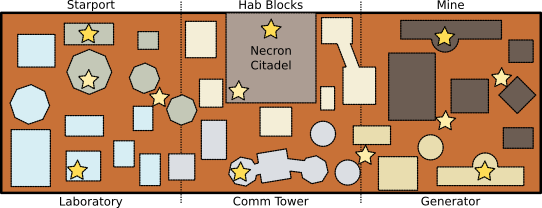
Seven players turned out for the Apocalypse on Solypsus 9. The board was 12’x4′, with lightly themed terrain sections representing the colony’s six installations: The Laboratory, Mine, Hab Blocks, Comms Tower, Starport, and Generator. Primary objectives were placed roughly evenly in fixed locations for each of those. Secondary objectives were then placed by each alliance outside their own deployment zone; these wound up largely along the centerline of the battlefield. Each player designated a warlord as usual and one of these for each alliance was chosen as their overall warmaster.

Battlefield for the Apocalypse on Solypsus 9.

Battlefield for the Apocalypse on Solypsus 9.

Scoring was conducted every game turn, with alliances earning:

  • Primary Objectives: Victory points worth the turn count divided by two (rounding up) per marker;
  • Secondary Objectives: One victory point per marker;
  • Warmaster: Six victory points for eliminating the opposing warmaster;
  • Warlords: Three victory points for each enemy warlord eliminated;
  • Superheavy vehicles, gargantuan creatures, and mighty bulwarks: Two victory points for each such enemy unit destroyed.

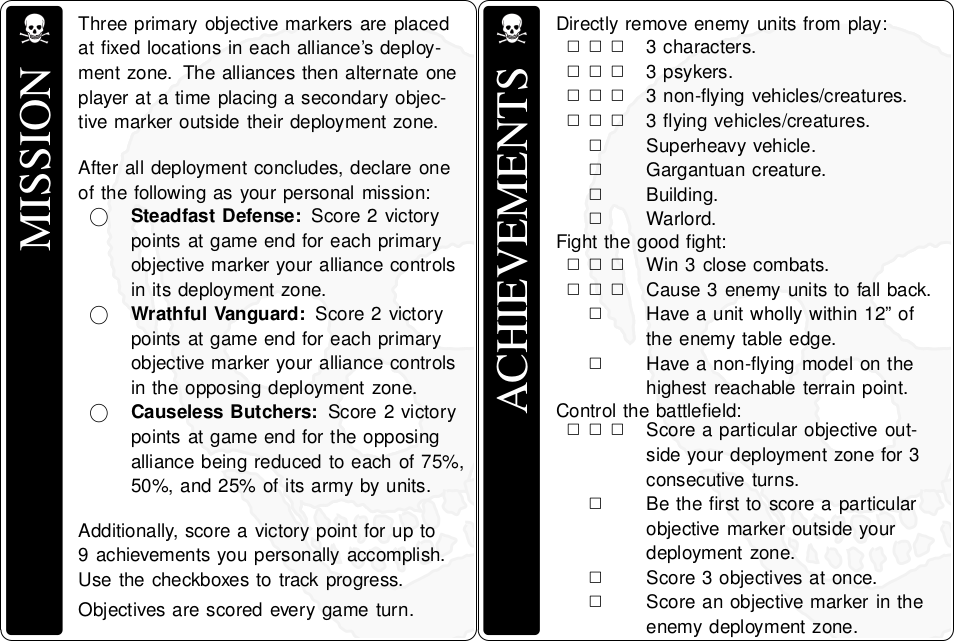
We also ran an individual tournament inside the battle. Before the game each player selected an overall mission for their alliance to work toward and be scored on. Throughout the battle they also earned points through personal tactical achievements, such as holding an objective or killing psykers.

Personal missions and achievements amidst the Apocalypse.

Personal missions and achievements amidst the Apocalypse.

Battle!

With a keen interest in why the Imperium had not simply written off the barren rock, the Legions of Discord once again descended on Solypsus 9. Their onslaught quickly supplanted the Spoiler Horde both physically on the planet, and mentally in the minds of the Forces of Order. With its existential foe now truly engaged, the Imperium had no choice but to commit all of its greatest resources to a final apocalyptic showdown for the planet.

Older minds, however, had other plans. Though their increasing presence throughout the war should have been a sign, all were caught off guard by the eruption of a Necron Citadel below the Hab Blocks, pushing aside and crumbling entire buildings as it rose to the surface. Solypsus 9 was thus revealed as a hidden tomb world, sleeping through the eons until the fighting awoke the martial ranks of the Old Ones. Chaos warriors and daemons quickly adapted, implicitly working in tandem with the automatons against the arrogant Emperor.

Against this combined threat, the Imperium’s finest leapt into battle. The Swords of Dorn and the Sanguine Hunters dropped an entire army onto the Necron Citadel. Squad after squad rushed from Drop Pods and Stormravens in an urgent attempt to preempt the legions of Necrons sleeping within from gaining a foothold on ground level. Kingbreakers dropped on the Starport directly among entire buildings of Nurgle’s pustulent champions in hopes of preserving orbital access from the ground. Dark Angels drove amongst the heavy machinery, cranes, and power silos of the Mine against the Iron Warriors building a fortress in its works.

Kingbreakers Squad Harbinger and Dark Angels Tacticals work to purge the alleyways and rubble surrounding the Hab Blocks.

Kingbreakers Squad Harbinger and Dark Angels Tacticals work to purge the alleyways and rubble surrounding the Hab Blocks.

Necron constructs engage the Swords of Dorn deploying from their Drop Pods.

Necron constructs engage the Swords of Dorn deploying from their Drop Pods.

But even as the alpha assault struck hard and Discord seemed to teeter on the precipice, the opposing forces were simply preparing for the counter-attack, the battle hardly begun.

Fleets of Necron flyers darkened the skies, raining bombs and Gauss blasts on ground forces before discharging Necron Warriors into vital positions. Their soldiers deployed to a myriad of critical locations across the battlefield, they then turned and took up dogfights with the Imperial air forces, harrying them throughout the conflict. Thus supported from the air, their legions quickly struck at the lightly guarded base of the Dark Angels’ charge on the east flank, contesting the Generator. Meanwhile, the first chapter’s forces already in the field were slowly ground to a halt against the impregnable defensive positions the Iron Warriors had already constructed among the Mine’s works. Their assault was finally completely repulsed when a Decimator’s malefic demon spirit rose from its own wreckage to lay Ezekiel low with a furious fusillade of Butcher Cannon fire.

A Soul Grinder exhorts Iron Warriors and Flesh Hounds on through the alleyways toward the Dark Angels' advance.

A Soul Grinder exhorts Iron Warriors and Flesh Hounds on through the alleyways toward the Dark Angels’ advance.

To the west, Kingbreakers and Nurgle daemons swept back and forth in mortal combat. Far extended into enemy territory and hotly embattled, the tide shifted for the Imperials when burning warriors of the Legion of the Damned materialized among their midst, blasting away the plague-ridden enemy hosts with eldritch fire. Such were the numbers of the horrors however that even this was not enough, and final control of the Starport came down to the lone Sergeant Titus holding his ground against a chittering insect daemon, locking the monstrous creature in close combat long enough for the facility to be secured.

At the beating heart of the battle, the Swords of Dorn and Sanguine Hunters together fought wave after wave of Necrons emerging from their risen Citadel. Harried by daemons prowling the edges, they carried the fight to the very entrances of the underlying tombs, eventually overcoming the defenders and stemming the tide of living metal gushing forth.

The Swords of Dorn fight to the very doorstep of the tombs.

The Swords of Dorn fight to the very doorstep of the tombs.

Nurgle is beset on all sides by the Legion of the Damned.

Nurgle is beset on all sides by the Legion of the Damned.

From the mounting piles of dead though lumbered the most horrible monstrosities. Towering above them all loomed The Lord of the Blighted Pit himself, Scabeiathrax. Called through The Warp by the rampant suffering, disease, and death wrought by the campaign, The Maggotspore coalesced into being already shuffling inevitably toward Order’s defensive line around the Laboratory. From mighty Knight Errants to foolhardy Tactical Marines, any that dared oppose its path were absentmindedly swept away by its foul claws. Soon it came to stand over the burning carcass of the Laboratory complex, unchallenged by all the Imperium’s might.

Scabeiathrax and the Knight Errant Greenheart face off among the Laboratory.

Scabeiathrax and the Knight Errant Greenheart face off among the Laboratory.

Outcome

After six turns, The Forces of Order emerged triumphant with 61 points to The Legion of Discord’s 51. At the final moment, Order held the Hab Blocks, Comms Tower, and Starport, while Discord claimed the Laboratory and Mine, and the Generator remained contested.

Jason and Alex won the individual honors for Discord and Order respectively with their daemons and Swords of Dorn, as well as claiming all the painting votes. TJ’s Sanguine Hunters claimed the prize for best general.

Mortalis Solypsus

This was the last stage for now of the battle for overall control of the colony. Later this summer though the combatants will descend into the wreckage of the Laboratory and Mine in search of the secrets buried deep therein. Stay tuned for yet more fighting in the campaign for Solypsus 9!

kingbreakers-iconEven on one knee in his mountainous power armor, Titus had to jam his chainsword into a rent piece of deck plate to keep from sliding back. His free hand instinctively tried to hold together his shattered torso, but of course could do nothing through the bloodied remnants of his armor. The furious windstorm beat by the daemon’s insectile wings was near overpowering. More than twice as tall as he, it was even more imposing nonchalantly hovering a few feet off the ground. Dismembered parts of his squadmates rolled past Titus in the gale and off the edge of the landing pad the monster had turned into its personal arena. As the wind shifted aside for a moment, Titus’ head lolled heavily, utterly exhausted. He saw what had caught the monster’s attention, a technical team moving into the nearby control buildings to attempt to activate any of the remaining bulk lifters. The beast gave another of its piercing shrieks, ratcheting up the pitch and volume so high it somehow blew out all the circuitry in his helmet. Vox traffic, sensor signals, the constant noise of a roiling battlefield, it all cut away instantly. In the sudden silent clarity that followed, Titus understood. He was going to die here, or worse. But if he could keep the daemon engaged and away from the control building, he would die doing his duty to the last. Shakily he stood up and freed his chainsword. With not a moment to spare, he charged forward and drove its revving blade up to the hilt in the side of the beast’s chest. It screamed at an even higher pitch and turned back toward Titus. Now he had its full attention.

Titus battles the daemon fly to keep it from the control building.

Titus battles the daemon fly to keep it from the control building.